Vim Thinking

I know I've grown tired of the "use VIM to be a super/rockstar/leet hacker dev!" posts... (and I use vim daily!) but give me a chance to flip the script for a second. I don't believe it is vim the software that improves the process of codewriting; rather vim the way of thinking.
Vim (the software) kinda sucks
I'll be honest... Vim kinda sucks.
Selecting, installing, updating, and resolving conflicts between all those plugins takes a lot of time.
And then you'll also want to write your own plugins and set up macros and shortcuts and ...
Yes, this makes Vim incredibly powerful and configurable. But also, makes it a nightmare to actually get into a useable state sometimes.
Vim (thinking) is amazing
So if Vim (the software) sucks so much; why do I use it professionally every day?
For one, at Root there are several Vim users that all share a common configuration; spreading that setup cost among multiple people.
For two, after learning Vim (the thought process) every other text editor felt cumbersome and slow.
Vim (thinking) literally changed my brain; it made me faster even in non-Vim editors. Even though I felt slower (than Vim) going back to my previous editors, I was actually faster than my pre-Vim days!
What is Vim thinking?
Today's code "editors" are actually mostly code "writers". What I mean by that is their main mode of interaction is to write new code. Their only means of "editing" is a pointing device, deletion, and a single buffer to hold content being copied (or cut, that special copy/delete combo) from one place to another.
Anyone who has used Vim for more than 10 seconds knows Vim starts in a mode that does not accept typing in new code. Why? Because Vim is an editor not a writer. Everything about Vim is geared towards the mutation of code; rather than the creation of code (and don't we mutate code far more than write new code?).
Let's take this psuedo-code example:
if (!DevelopmentEnvironment.usingVim) {
  const vimCandidates = ["vi", "vim", "nvim", "vim_plugin"];
  const randomIndex = randIntBetween(vimCandidates.length, 0);
  DevelopmentEnvironment.setCurrentEditor(vimCandidates[randomIndex]);
}
Hopefully clear logic: if you are not using a Vim-ish editor; attempt to randomly assign a Vim-ish editor to your dev environment. But whoops! I have a little typo: randIntBetween is supposed to have the smaller number as the first argument. How do we fix this?
In non-Vim editors, I might do something like:
- Move my hand from the keyboard to the mouse
- Track the pointer to reach the location between the
0and the closing paren)and click - Move our hand from the mouse to the keyboard and backspace once
- Type our
vimCandidates.length(maybe we have autocomplete to help a little) - Move our hand from the keyboard to the mouse (again)
- Track the pointer and click to select the first
vimCandidates.length - Move our hand back to the keyboard (again)
- Backspace and type the
0
With slightly more of what I call Vim thinking, I would:
- Move my hand from the keyboard to the mouse
- Track the pointer and click to select the
vimCandidates.length - Cut the text (without having to move my hand from the mouse)
- Track the mouse pointer to the beginning of
0 - Paste the text at that location
- Still with my hand on the mouse, select the
0and cut the text - Track back to before the comma and paste the
0
Let's pause to examine the difference. In the first case we moved our hand between the keyboard and mouse 4 times as much! And you may think, "What's the big deal? My mouse is a few inches away" (I know I thought that). Well what if your app was making 4 network calls when it could be making 1 or even 0? Would you not immediately refactor to be more efficient?
Now see what I would do in Vim:
- Use
jorkto move to the third line - Type
fvto move direcly on the start ofvimCandidates.length - Type
dt,to cut the content from there until the comma f0to move onto the zerovpto highlight the zero and paste over it withvimCandidates.lengthF,to move back to the commaPto paste the zero before that comma (because when pasting over in step 5, it also copied the0as I was pasting)
In this case I have not moved my hand to the mouse at all! Even more I haven't moved my hands from the home row. And many are scoffing at this point, "Why would I spend the time to memorize and type all those commands to save 5 inches of movement?" To that I say, did you "memorize" how to spell apple or orange? When you type them do you mentally go through each letter: A then p then p then l then e; to control each finger to type those letters? (If so this post isn't for you... take a step back to learn better typing) No! When I type apple, mentally I'm moving my fingers in a single motion "apple" not five distinct movements to type "a-p-p-l-e". And after a few weeks of using Vim, that's what I do there as well: I don't type "f-v - d-t-," I type "fv dt," as though they were words in a sentence.
So what do I mean by Vim thinking? Look back to our first "edit" strategy: I deleted and retyped my code. Compare to the second and third: I edited my code to rearrange the function arguments.
Now do you see why Vim does not start in a mode to type code? It is an editor first; writing is a secondary function.
Edit, Don't Write
Vim was difficult for me at first. Partly because of the dreaded learning cliff. Mostly because I did not understand how Vim wanted to be used.

Footage of me trying to use Vim, 2012, colorized
So I put it down. Then when I was onboarding at Root, I sat down with someone who knew Vim thinking. It was a revelation watching them work. There was still the learning cliff to overcome, but now I had seen what sat atop the hill. And I wanted it.
A writer will delete and retype. An editor will transpose, cut, pattern match, and find a path of least change. A writer wants faster typing. An editor uses less typing. A writer offloads writing to the machine. An editor melds the machine and the mind. A writer sees what they want. An editor sees the path to get where they want.
Use an editor, not a writer.
Vim Thinking is Machine Thinking
Vim provides a full language of editing semi-structured text of any kind. Like the letters in these words form into sentences transferring my thoughts to your mind; the commands of Vim stack into words, which flow through sentences, and paragraphs, perfectly telling my pile of sand and copper how to rewrite its code.
In Vim, I'm never more than a few keystrokes from code I've imagined to a coded reality. Being that close means I can iterate through my ideas more quickly. Most of my ideas are bad to awful; throwing them away as quickly as possible is the best thing I can do with them.
In a recent article, I talked about how the process of making something directly affects the results. Code written with Vim thinking has unique qualities from code written in other ways. Physically enacting the same mechanics that my computer uses to interact with its world gives me an empathy and understanding of it. That understanding makes code easier to read. That understanding makes code easier to write.
Getting into Vim Thinking
Pick a flavor: a plugin, neovim, vim. Don't customize it (yet), just dive in. We want to start thinking in Vim, not die in the quagmire of configuration.
If you can learn about two dozen "letters" in the language of Vim, you will be at least as quick in Vim as any other and over the main cliff where patterns will start to emerge making learning easier. Funnily enough that's about how many letters are in english; so if you can read this, I know you can learn Vim thinking. Here is my Vim DAG mapping the concepts covering 80% of what I use in Vim.
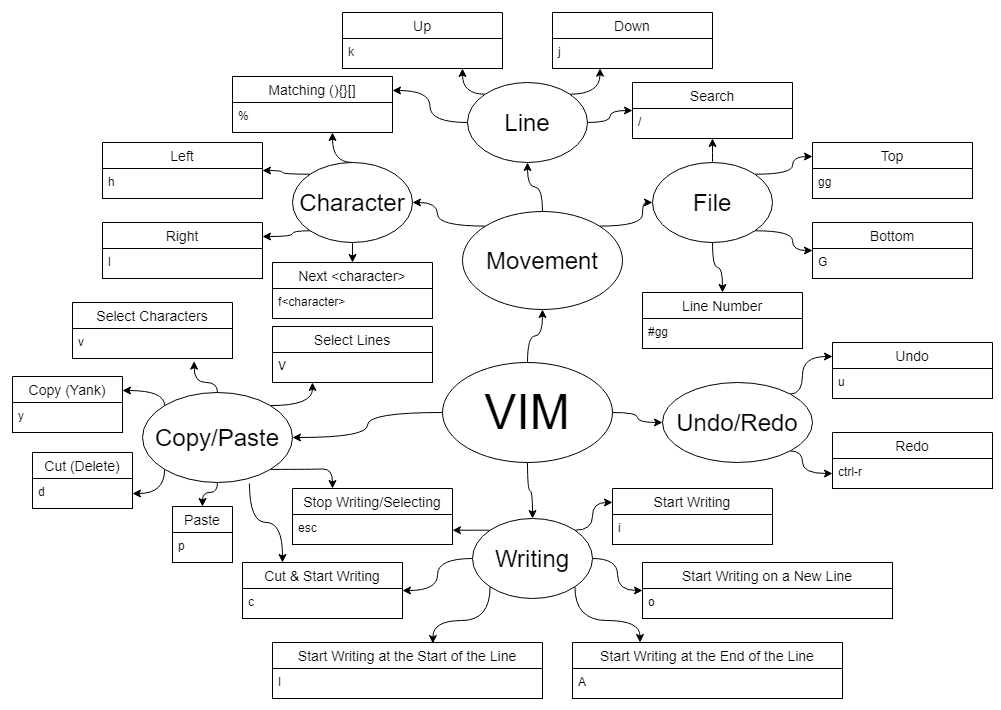
And here is the challenge to get you Vim thinking:
- Go back to that psuedo-code above, copy it into a file and open with Vim; make the correction; and refactor that psuedo-code into as few lines as possible.
- Extra challenge: never enter insert mode (don't use
i,o,a, orcfrom the diagram).
If you do that (especially with the extra challenge) I think you'll have enough of a taste of Vim to understand this whole rambling post I call an article (and probably enough to want more Vim in your life).
Going Deeper
So you want more Vim now? 😈 Good (secretly high-fives Iviminati friends). There are three more things that seriously leveled up my productivity in Vim (that I now miss in most other editors):
- Multiple copy/paste buffers
- Recording and replaying Macros
- Basic Regular Expressions for searching (and replacing)
Have fun!
About the author
Following Jesus; Husband; Father; Developer; Gamer; Tinkerer; Writing about code
Comments
Join the discussionNo comments yet. Be the first to comment.


